
By Clint Sanchez · Published · Updated · 4 min read
Quick answer
Google five video SEO best practices are: make each video publicly accessible on its own crawlable page, mark it up with Schema.org VideoObject structured data including title, description, duration, thumbnail, and content URL, provide high-quality thumbnails Google can fetch, submit a video sitemap, and keep the video file fetchable so the page qualifies for video previews and key moments. Google reads on-page text, backlinks, structured data, and the file itself.
Key takeaways
- Google shared its five video SEO best practices in a Lightning Talks presentation on its YouTube channel.
- Google understands a video through four signals: on-page text near the video, backlinks to it, structured data, and the video file itself.
- A video needs its own web page with a URL Google can access, and it must load without complex user actions.
- VideoObject markup should include the title, description, duration, thumbnail, and video content file URL; extra markup enables features like the LIVE badge.
- If a thumbnail URL is blocked in robots.txt, the page probably will not appear in video search features.
- A video sitemap is an often-overlooked way to pass video metadata to Google.
- When Google can fetch the video file, the page becomes eligible for video previews and key moments; the max-video-preview robots meta tag controls preview length.
Recently, Google shared five video SEO best practices in a Lighting Talks presentation on its YouTube Channel.
Keep reading to learn what the search engine giant had to say about optimizing your videos for search engines.
Google’s 5 Best Practices for Video SEO
When Google speaks, it’s best to listen. Sometimes they let us know what their web crawlers are looking for and what they use to rank a page (or video) on the search engine results pages.
In the latest Lightning Talks video, they talked about how site owners and SEO professionals can send signals to explain better what a piece of video content is about to help search engines know how to list them to answer searchers’ queries and display them in search and discover.
Once search engines know what a video is about, they can show them when answering a user query.
Here’s a quick overview of Google’s advice for optimizing your videos for search engines.
Video SEO Signals that Google Looks For
Google uses the following signals to understand a video’s content:
Want this handled for you? We build and market websites for Louisiana businesses, and we will tell you honestly if you do not need us.
- On-page text: Page titles, headings, and captions near your video
- Backlinks: Links from websites and elsewhere on the internet to your video
- Structured Data: HTML markup that communicates your video’s metadata to Google.
- Video Files: Google is becoming more and more able to understand the audio and visual content.
Video SEO is all about adding the proper elements to a page so that the above signals are communicated clearly to Google.
Google’s Recommended Video SEO Best Practices
Here are the five best practices (according to Google) for getting your videos found and understood by search engine crawlers.
Make your video publicly accessible
The first thing you should do to have your videos discovered by Google is to make sure that they’re available publicly on the web.
To do this, make sure that the video has a corresponding web page with a URL that Google can access.
Additionally, your video needs to be easily seen on the page without requiring visitors to perform complex actions to load it.
Include Structured Data
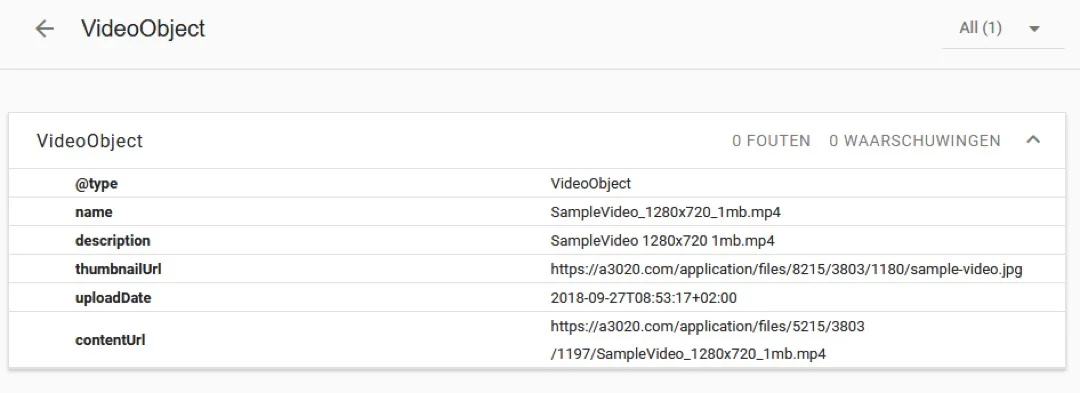
The next step in helping Google find videos and better understand their content is making sure that they are marked up with Schema.org’s VideoObject markup.
This markup can include information such as the:
- Video title
- Description
- Duration
- Thumbnail
- Video content file URL
Additional structured data can also be added to enable special search features, such as the “LIVE” video badge for live streams.
Provide High Quality Thumbnails
Make sure to provide high-quality thumbnails for your video at URLs that Google can access.
If a thumbnail isn’t readily accessible to Google, it’s highly possible that the page won’t appear in video features.
For example, if the URL with the thumbnail (or the image itself) is blocked in your robots.txt, then Google won’t be able to access it.
Submit a Video Sitemap
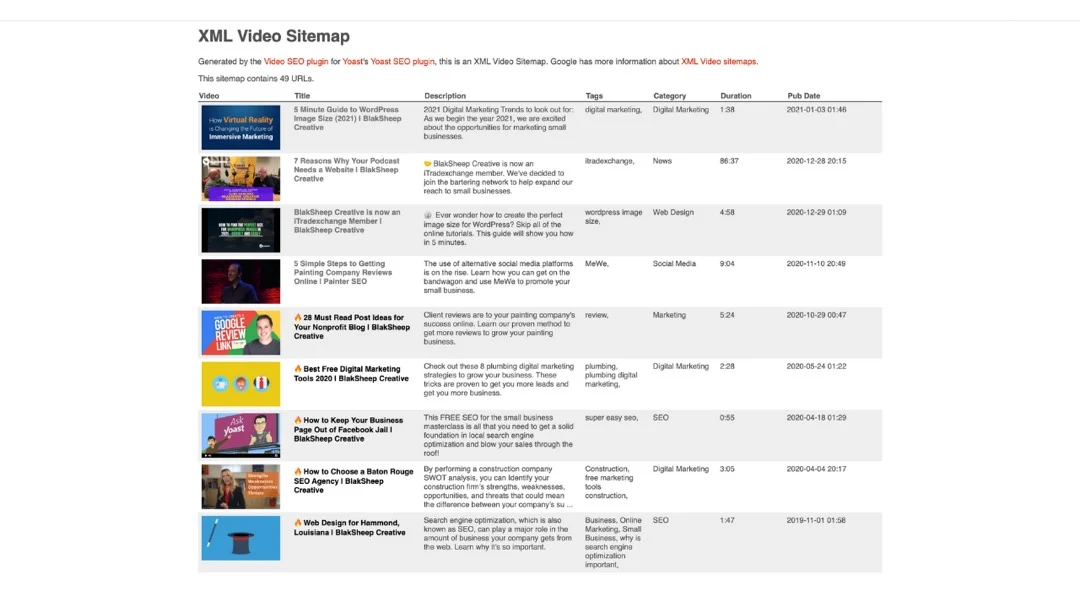
Another easy (and often overlooked) way to help Google and other search engines find video content associated with pages on your website is creating a video sitemap.
This sitemap can be used as another way to include metadata tags to better help Google understand your video’s content
Accessible Video Files
Much like your video thumbnails, you want to make sure that Google can fetch the actual video files so that your pages will be eligible for enhanced search features such as video previews and key moments.
Video previews is a relatively new feature in search results pages whereby Google grabs a snippet consisting of a few seconds from a video and uses it as a clip, which tends to be more engaging than an ordinary, static thumbnail.
You can use the max-video-preview robots meta tag to limit and control the length of the previews.
The better that Google can use your video files to understand their content, the more the likelihood of them appearing for relevant searches.
Make sure Google can fetch your video content files so your pages are eligible for search features like video previews and key moments.
Video previews are a feature in search results where Google grabs a few seconds from a video to use as a clip, which can be more engaging than a static thumbnail.
You can use the max-video-preview robots meta tag to control the length of these previews.
When Google can analyze the content of videos using the file itself it can surface them for more relevant queries.
If you’d like help optimizing your videos for search engines, or need any other digital marketing, drop us a line, we’d love to help you expand your digital footprint.
Some of the ways we help small businesses grow online:
- Website Development
- Local Search Engine Optimization
- Video Asset Creation
- Google Business Profile Setup and Optimization
- Content Marketing
Get professional SEO help today!
About the author

Founder & Lead Developer · Denham Springs, LA
Clint has built and marketed websites for 26 years, since founding BlakSheep Creative in 2000. He is also a 29-year firefighter and a 23-year member of IAFF Local 557, which is where the bias toward plain answers over sales copy comes from.
- Veteran-owned
- Firefighter-owned
- IAFF Local 557
Common Questions About Video SEO
Short answers to the questions that come up most on this topic.
What signals does Google use to understand a video?
What structured data should a video page have?
Why does the thumbnail matter for video SEO?
What is a video sitemap and do I need one?
What are video previews and key moments?

Your next step, without the guesswork
No surprises, clear next steps, and a fixed price before anything starts.