
By Clint Sanchez · Published · Updated · 4 min read

Quick answer
An orphaned page is a page on your website that no other page links to. Search engines discover and index content by following internal links, so an orphaned page is rarely crawled, receives no link equity, wastes crawl budget, and stays invisible to visitors. Find them with crawl reports, tools such as Ahrefs or Semrush, or a manual sitemap audit, then fix them by linking from high-traffic pages, grouping content into topic hubs, and using descriptive anchor text.
Key takeaways
- An orphaned page has no internal links pointing to it, so neither users nor crawlers have a path to reach it.
- According to a study on arXiv, around 15% of all Wikipedia articles across 319 language versions are orphaned, so smaller sites are almost certainly worse.
- Pages without internal links are less likely to be crawled and indexed, per Semrush, which means little chance of appearing in search results.
- Search engines allocate a crawl budget to each site, and orphaned pages spend it without helping important pages get found.
- Internal links pass page authority; an orphaned page receives none, which hurts its ability to rank.
- Find orphans with Google Analytics, Ahrefs, or Semrush, crawl reports, or a manual sitemap check against internal links.
- Fix them by linking from popular pages, building topic hubs, using descriptive anchor text, and auditing every time new content is published.
Most Baton Rouge business sites that come to BlakSheep Creative for an audit have the same orphan: a city or service page someone added years ago, never linked from the menu, still indexed, still ranking on page four for a term the business actually wants. Pulling that page into the site structure is often the cheapest local SEO win available.
If you’re working hard on your website’s SEO and content but still not seeing the traffic you want, there’s a stealthy culprit that might be undermining your efforts, orphaned pages. These “hidden” pages lack internal links from other pages on your site, making them nearly invisible to both search engines and users. In this article, we’ll get into why orphaned pages are a serious issue, how they can hurt your website, and what you can do to bring them back to life.
What Are Orphaned Pages?
Simply put, an orphaned page is a page that has no internal links from other pages on your website. It exists in isolation, with no roadmap guiding users or search engine crawlers to it. Think of it as a treasure chest filled with valuable content, hidden away without a map for anyone to find it. It’s like creating great content and locking it in a vault without a key.
You can have great pages, but if they’re disconnected from the rest of your site, they’re functionally invisible. That same principle applies to the broader structure of your website and your SEO process. If scope creep, untracked edits, or outside third parties constantly change your content without a clear internal linking plan, you end up with pages that search engines and visitors can’t rely on.
Want this handled for you? We build and market websites for Louisiana businesses, and we will tell you honestly if you do not need us.
How Common Are Orphaned Pages?
Orphaned pages are surprisingly common. For instance, around 15% of all articles across 319 language versions are orphaned in Wikipedia alone. This means that even with the immense linking structure of Wikipedia, a significant chunk of content is effectively invisible. Imagine how much more common orphaned pages are on smaller, less organized sites!
The Hidden Costs of Orphaned Pages
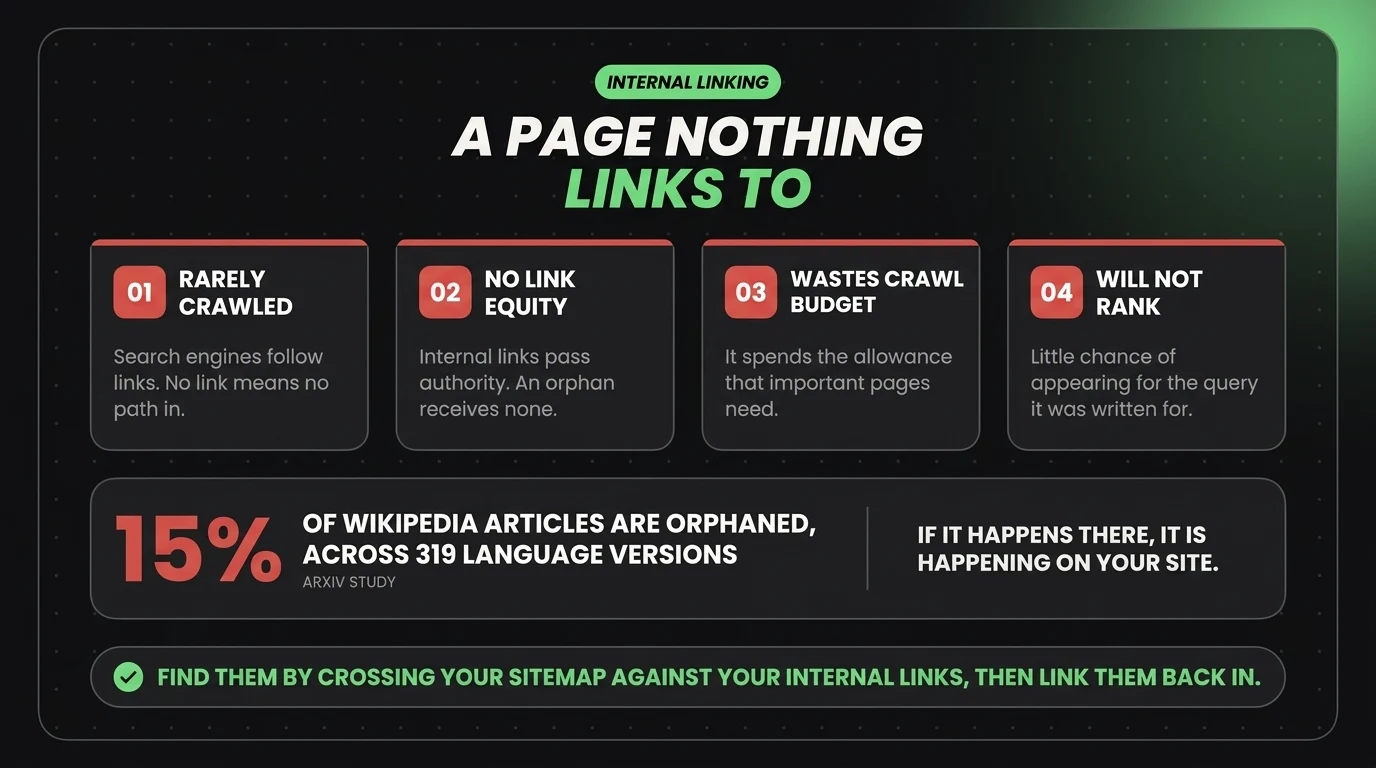
So, why should you care about orphaned pages? The answer lies in the significant impact they can have on your SEO, user experience, and overall site performance.
1. Reduced Search Engine Visibility
Search engines like Google use internal links to discover and index content. Pages without links are less likely to be crawled and indexed, meaning they have little chance of appearing in search results. Adding internal links to orphaned pages can significantly increase their visibility and pageviews.
2. Poor User Experience
Imagine navigating a website without guidance and getting lost in a maze of isolated pages. Orphaned pages create a poor user experience by hiding valuable content from users. If a page has information that could engage users, increase time on site, or encourage conversions, it’s a loss when no one can find it.
3. Wasted Crawl Budget
Search engines allocate a specific “crawl budget” to each site, the number of pages they’ll crawl on a given visit. Orphaned pages can lead to inefficient use of this budget, leaving critical pages less accessible. Search engines may miss newer or more important content if they spend time on isolated pages with no internal links.
4. Missed Page Authority Distribution
Internal links help distribute page authority, or “link equity,” across your website. By linking from high-traffic pages to others, you signal their importance to search engines. Orphaned pages don’t receive this benefit, which can hurt their ability to rank.
How to Identify Orphaned Pages on Your Site
The first step to fixing the issue is identifying your orphaned pages. Here’s how:
- Use Analytics and SEO Tools: Tools like Google Analytics, Ahrefs, or SEMrush can help you find pages with no internal links pointing to them.
- Check Crawl Reports: These reports show crawled pages but lack inbound links.
- Manual Audit: Review your site map and verify if each page is accessible through internal links.
An orphaned page has no internal links pointing to it, so neither users nor crawlers have a path to reach it.
Strategies to Bring Orphaned Pages Back into the Fold
Ready to make your orphaned pages visible? Here’s how to integrate them into your website’s internal linking structure:
- Link from High-Traffic Pages: Add internal links from popular pages to orphaned ones. This not only increases visibility but also passes link equity.
- Create Topic Hubs: Group content into relevant hubs or clusters. For instance, if you have a blog post on “SEO Basics,” provide links to related orphaned pages on advanced SEO tips. Additionally, a local SEO topic hub could connect guides about service area strategy, city pages, and trash can cleaning service area pages so related posts support each other.
- Use Descriptive Anchor Text: Make links more user-friendly and appealing to search engines by using descriptive anchor text.
- Regularly Audit Your Site: As you add new content, make sure it’s linked from other pages. Set up a process to avoid creating new orphaned pages.
The Bottom Line: Don’t Let Great Content Go to Waste!
Orphaned pages might be hidden from view, but their impact on your site’s performance is far from invisible. By bringing them back into the fold, you make sure your valuable content is not wasted. Every page on your site should have a purpose, and by linking strategically, you can boost both user experience and SEO performance.
Ready to optimize your website’s structure and eliminate orphaned pages for good? BlakSheep Creative can help you build a fully connected, optimized, and primed website for top search engine performance. Reach out to us today, and let’s make sure every page on your site shines. Fill out the form below to get started today!
Wondering if your SEO is actually getting traction, or where to focus next? Let’s diagnose it in a 15-minute Discovery Call.
About the author

Founder & Lead Developer · Denham Springs, LA
Clint has built and marketed websites for 26 years, since founding BlakSheep Creative in 2000. He is also a 29-year firefighter and a 23-year member of IAFF Local 557, which is where the bias toward plain answers over sales copy comes from.
- Veteran-owned
- Firefighter-owned
- IAFF Local 557
Common Questions About Orphaned Pages
Short answers to the questions that come up most on this topic.
Why do orphaned pages hurt SEO?
How do orphaned pages happen?
What tools find orphaned pages?
What is the fastest way to fix an orphaned page?
Should orphaned pages be deleted instead of linked?
How do you prevent new orphaned pages?

Your next step, without the guesswork
No surprises, clear next steps, and a fixed price before anything starts.