
By Clint Sanchez · Published · Updated · 7 min read
Quick answer
The KPIs worth tracking in Google Analytics 4 are key events, engagement rate, average engagement time, and organic sessions by landing page. Key events count the actions that make you money, engagement rate shows how much traffic was real interest, engagement time shows attention per page, and sessions by landing page shows which pages earn it.
Key takeaways
- A real KPI connects to revenue, moves with your work, and points at a lever. Most GA4 metrics fail all three tests.
- Google renamed conversions to key events. Mark only the actions that produce revenue: calls, forms, bookings, qualified chats.
- GA4 counts a session as engaged if it lasts 10 seconds or more, includes a key event, or includes two or more page views.
- Read average engagement time per page, never site-wide. A 12-second contact page is healthy and a 20-second long guide is not.
- Break organic sessions out by landing page. That list is a work order, not a vanity number.
- Search Console holds the before-the-click metrics. Link it to GA4 so impressions, position, and click-through rate sit alongside behavior.
- If a metric doubled and you would do nothing differently, it is not a KPI and does not belong on the report.

Want this handled instead of DIY?
A 15-minute call, no script, no pressure. You leave with a plan either way.
The KPIs worth tracking in Google Analytics 4 are key events, engagement rate, average engagement time, and organic sessions by landing page. Key events count the actions that make you money. Engagement rate shows how many visits were real. Engagement time shows attention. Sessions by landing page shows which pages earn it. Everything else in GA4 is diagnostic, not a KPI.
What is a KPI?
A key performance indicator is a number you would change a decision over. That definition is stricter than the one most dashboards use, and it is the useful one.
Google Analytics reports hundreds of metrics. Almost none of them qualify. Pageviews go up when you publish more, which tells you that you published more. Users goes up when a post gets shared, which tells you a post got shared. Neither one changes what you do on Monday.
A real KPI passes three tests. It connects to money or to the thing that produces money. It moves when your work is good and stalls when it is not. And when it moves, you know which lever moved it. Four metrics in GA4 pass all three for a small business, and the rest of this article is about those four and how to set them up.
The four KPIs worth tracking in GA4
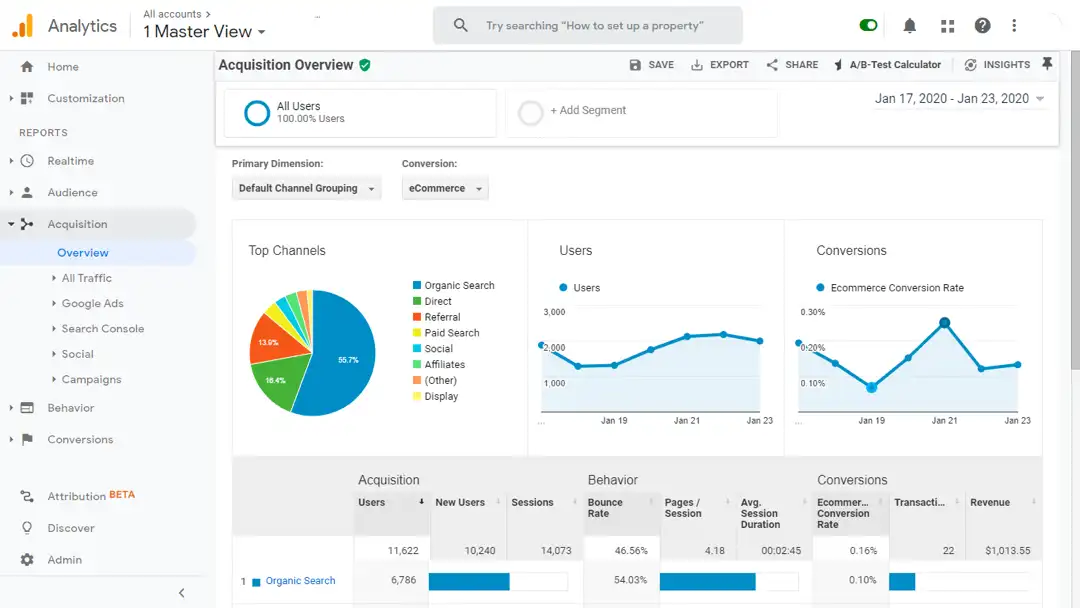
Here they are together, with where to find each one, before we take them one at a time.
| KPI | Where it lives in GA4 | What it tells you |
|---|---|---|
| Key events | Reports, then Engagement, then Key events | How many people did the thing that matters: called, submitted, booked |
| Engagement rate | Reports, then Acquisition, then Traffic acquisition | How much of your traffic was real interest rather than an accidental click |
| Average engagement time | Reports, then Engagement, then Pages and screens | How long visitors actually paid attention, per page |
| Organic sessions by landing page | Traffic acquisition, filtered to Organic Search, with Landing page as the dimension | Which pages are doing the work of bringing people in |
Key events, formerly conversions
This is the only KPI on the list that touches revenue directly, and it is the one most small business accounts have never configured.
Google now calls these key events rather than conversions. In its documentation, a key event is "an event that measures an action that's particularly important to the success of your business", and any event you already collect can be marked as one. Conversions is now reserved for the version imported into Google Ads.
For a service business, the list is short: a phone call from the site, a form submission, a booking, and a chat that produces contact details. Mark those four and nothing else. Marking a scroll or a PDF download as a key event makes the number bigger and the report useless.
If none of this is set up, that is the first afternoon of work, and it is more valuable than every other change in this article combined. We make the longer case in why you have to track conversions.
Engagement rate
Engagement rate is GA4's replacement for reading bounce rate backwards, and its definition is refreshingly specific.
Google defines an engaged session as one that lasts 10 seconds or longer, has one or more key events, or has two or more page or screen views. Engagement rate is the share of sessions that met at least one of those. Bounce rate is simply the inverse.
The reason it is worth watching is diagnostic. Traffic that arrives and leaves in under ten seconds with no second page is traffic you attracted for the wrong query. A page with a lot of sessions and a low engagement rate is usually ranking for something it does not actually answer, and the fix is the page's opening, not more traffic to it.
Average engagement time
Engagement time measures only the period the page was actually in focus, which makes it far more honest than the old time-on-page figure.
Read it per page rather than site-wide. A 90-second average on a service page is a good sign. A 20-second average on a 2,000-word guide means people are not finding what they came for in the first screen. A 12-second average on a contact page is fine, because they came to get a phone number and they got it.
Site-wide averages hide all of that, which is why the number is nearly useless on a dashboard and useful in the Pages and screens report.
Organic sessions by landing page
Total traffic is a vanity number. Organic traffic broken out by the page that received it is a work order.
Filter Traffic acquisition to Organic Search and switch the dimension to Landing page. You now have a ranked list of the pages Google sends people to. The top of that list tells you what to build more of. The middle tells you which pages are one improvement away from mattering. The bottom is usually pages that should be merged or retired.
Compare it month over month, not day to day. Search moves slowly enough that daily numbers are noise.
SEO KPIs in Google Analytics, and the ones that are not in it
Google Analytics is half of the SEO picture. It tells you what happened after the click and knows nothing about what happened before it.
Split your SEO KPIs by which tool actually holds the answer:
| Question | Tool | Metric |
|---|---|---|
| Are we being shown for the right searches? | Search Console | Impressions and average position by query |
| Are people choosing us in the results? | Search Console | Clicks and click-through rate by page |
| Did the visit go anywhere? | Analytics 4 | Engagement rate and average engagement time |
| Did it produce a lead? | Analytics 4 | Key events, segmented to Organic Search |
The pattern that finds the most opportunity in the least time is a page with high impressions, a poor position, and a low click-through rate in Search Console. That is a page Google is already showing and nobody is picking, and it is usually a title and description problem rather than a content problem.
Link the two tools together so Search Console data appears inside GA4. It takes about five minutes in Admin and saves a tab switch every time you look.
Metrics that look like KPIs and are not
Every one of these shows up on agency reports, and every one of them can move in the wrong direction while the business improves.
- Pageviews. Rises when you publish, when a page gets shared, and when a bot slips through. Says nothing about outcomes.
- Users. Useful for context, meaningless as a target. Ten thousand users who wanted something you do not sell is worse than two hundred who did.
- Bounce rate. In GA4 it is just the inverse of engagement rate. Tracking both is tracking one number twice.
- Sessions per user. Interesting for a publisher. Irrelevant for a business selling one roof per customer per decade.
- Average session duration, site-wide. An average across a contact page and a long guide describes neither.
The test to apply to any metric on a report: if this number doubled next month, what would you do differently? If the answer is nothing, it is not a KPI. That is also the fastest way to shorten a report nobody reads.
A real KPI connects to revenue, moves with your work, and points at a lever. Most GA4 metrics fail all three tests.
Setting the four up, in order
This is roughly one afternoon of work and it does not need a developer for most small business sites.
- Confirm GA4 is actually collecting. Open Realtime and load your own site on a phone. If nothing appears, nothing after this matters.
- Make phone taps and form submissions into events. Most site builders and tag managers can fire an event on a tel link click and on form success.
- Mark those events as key events in Admin, and mark nothing else.
- Link Search Console to the property in Admin so query data appears in your reports.
- Build one comparison in Traffic acquisition: Organic Search sessions and key events by landing page, saved so you can open it in one click.
Then leave it alone for a month. Reading a new setup daily teaches you the shape of noise, not the shape of your business.
A monthly review that takes 30 minutes
The point of KPIs is the decision at the end, so put the review on the calendar and give it a fixed shape.
Answer four questions, in this order. Did key events go up or down against last month, and against the same month last year? Which landing pages gained or lost organic sessions? Which page has traffic but a weak engagement rate? And what is the single change you will make before the next review?
One change a month, chosen from data, beats a redesign chosen from a hunch. That is also the discipline behind everything in our conversion rate optimization guide, and it is why a page with visitors and no calls is a fixable problem rather than a mystery. We worked through a real example of that in clicks but no calls.
Rankings belong in the same monthly review, as long as you know where each one came from. Our breakdown of how accurate SEO ranking reports really are separates numbers Google reports from estimates a tool made up.
Where to start
Open GA4 and check one thing: are key events configured, and do they match the actions that actually produce revenue for you? If the answer is no, everything else on your dashboard is decoration.
If you want the tracking set up properly and reported in plain language every month, that is part of how we run digital marketing, and we will tell you honestly if your setup only needs an hour. There is more on the site side in turning website visitors into customers.
About the author

Founder & Lead Developer · Denham Springs, LA
Clint has built and marketed websites for 26 years, since founding BlakSheep Creative in 2000. He is also a 29-year firefighter and a 23-year member of IAFF Local 557, which is where the bias toward plain answers over sales copy comes from.
- Veteran-owned
- Firefighter-owned
- IAFF Local 557
Common Questions About Google Analytics KPIs
Short answers to the questions that come up most on this topic.
What are the most important KPIs in Google Analytics 4?
What replaced conversions in Google Analytics?
What counts as an engaged session in GA4?
Is bounce rate still useful in GA4?
Which SEO KPIs are not in Google Analytics?
How often should I review my analytics KPIs?

Your next step, without the guesswork
No surprises, clear next steps, and a fixed price before anything starts.