
Short answer: Website accessibility isn’t just about avoiding lawsuits. It’s about stopping silent conversion losses, improving SEO and AI visibility, and making sure your website actually works for real people—no matter how they navigate the web.
TL;DR for Busy Business Owners
- Accessibility issues: Quietly block real customers by preventing keyboard and screen-reader users from navigating, filling out forms, or checking out
- WCAG 2.1 Level AA is the standard most commonly used as the practical benchmark for creating websites that users find accessible and reliable, helping you build trust and confidence in your online presence.
- Accessibility fixes are often structural and manageable, giving you the power to improve your site without a complete redesign, which can be reassuring for small business owners seeking practical solutions.
- Regular testing and audits help you stay ahead of issues, giving you confidence that your website remains accessible and effective for all users, including those relying on assistive tech.
Is your website quietly turning customers away?
Most business owners don’t think so. And to be fair, you probably didn’t build your site to exclude anyone. But online, it’s surprisingly easy to create the digital equivalent of a “No Entry” sign—without ever realizing it.
We see this constantly at BlakSheep Creative. A business invests in design, SEO, advertising, and content… yet still struggles to generate leads. They assume it’s messaging, targeting, or competition. Sometimes it is. But sometimes the site itself is the problem.
Not because it’s ugly. Not because it’s slow.
Because it’s not usable for everyone.

The Problem Most Business Owners Don’t Realize They Have
No business owner would put a literal “No Entry” sign on their front door. But online, websites do this in quiet ways:
- Navigation that only works with a mouse
- Buttons that look clickable but aren’t announced properly to assistive tech
- Forms that can’t be completed without perfect vision and fine motor control
- Text that’s readable in your office… but unreadable on a phone in sunlight
Here’s what makes this tough: most of those failures don’t show up in your analytics. Users don’t always report the issue. They don’t always call. They just leave.
And if you’re running ads or paying for SEO, that’s not just a compliance concern. That’s a conversion leak.
What Website Accessibility Actually Means Without the Jargon
Website accessibility: Means your site works for people who use screen readers, navigate by keyboard instead of a mouse, rely on captions, or need higher contrast and predictable layouts.
The global standard behind accessibility is the Web Content Accessibility Guidelines (WCAG).
If you’ve ever searched for “WCAAG,” you’re not alone. That misspelling is extremely common. It usually means the same thing: you heard something about accessibility, ADA, or lawsuits… and you’re trying to figure out if it’s real.
It is.
Why Accessibility Suddenly Matters to Small Businesses
Small business owners used to assume accessibility lawsuits were for big corporations. That assumption has aged out.
Today, accessibility enforcement is largely automated. Scanning tools can crawl thousands of websites and flag issues at scale. Then demand letters go out.
That means obscurity isn’t protection anymore. A small local service business can show up on the radar just as easily as a national brand.
One of the biggest reasons small businesses get hit is simple: it’s cheaper to settle than to fight. Plaintiffs’ attorneys know this. And they know that many business owners don’t have internal counsel or dev teams ready to respond.

Does the ADA Really Apply to Websites?
In many situations, yes.
Website accessibility claims are typically based on the Americans with Disabilities Act (ADA), which requires equal access to places of public accommodation.
Courts have not been perfectly consistent in how they interpret websites under Title III, but the trend is clear: websites are increasingly treated as part of how businesses provide services to the public.
A commonly referenced case is Robles v. Domino’s Pizza, where a blind customer couldn’t place an order online using assistive technology. The court found that the website and app had to be accessible because they functioned as a gateway to the business’s goods and services.
Practical takeaway: If your website is how customers book, buy, contact you, or access services, you should treat accessibility as a real business requirement—not a “nice to have.”
Why New York and California Increase Risk Even If You’re Not There
Two states come up constantly in accessibility discussions:
- New York: Currently one of the most active jurisdictions for website accessibility lawsuits
- California: Adds exposure through state law, including statutory damages under the Unruh Civil Rights Act
If your website is accessible to customers in those states—and you ship there, serve there, or market there—your physical location doesn’t guarantee safety.
This is one reason we tell business owners not to treat accessibility as a “local-only” issue. The internet doesn’t work like that.
The Standard That Actually Matters: WCAG 2.1 Level AA
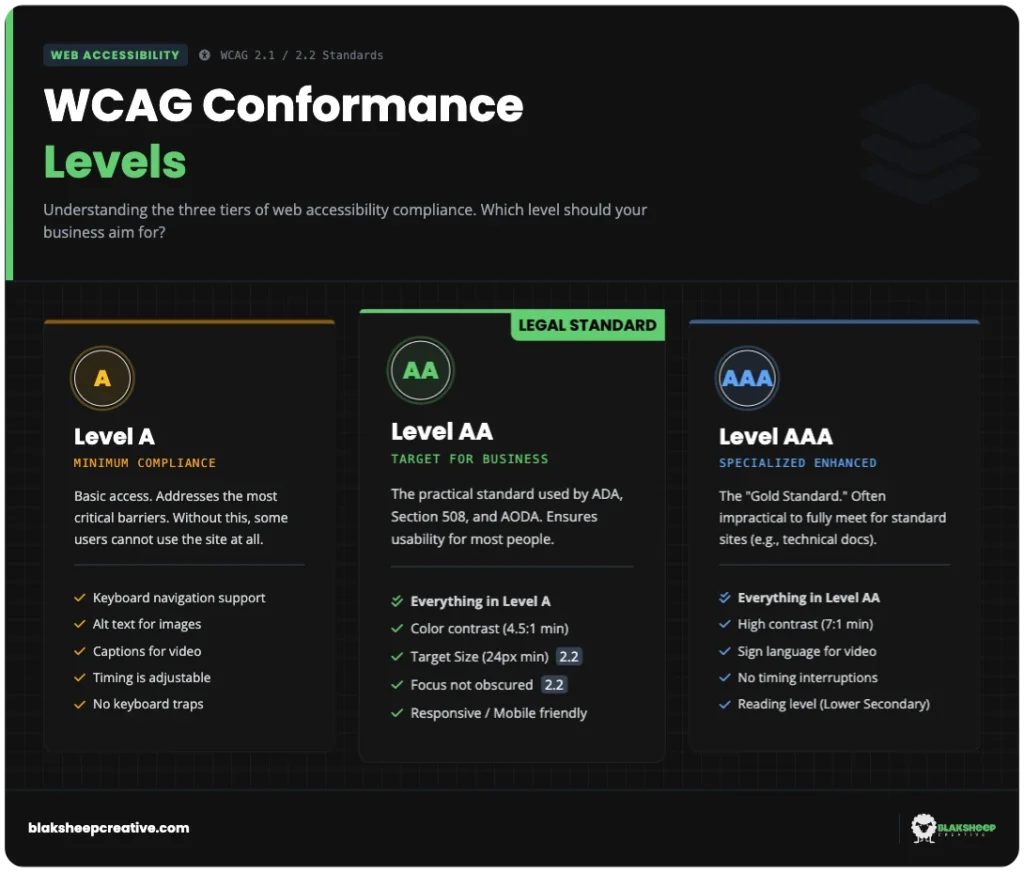
WCAG 2.1 Level AA: The most widely referenced practical benchmark for accessibility, and the level most often used in real-world settlement expectations, because it balances usability and compliance for small businesses.
WCAG includes three conformance levels:
- Level A: The baseline “floor” that fixes only the most critical blockers
- Level AA: The practical target that addresses common barriers like contrast, navigation clarity, and interactive usability
- Level AAA: The “ceiling” that is often unrealistic and cost-prohibitive for most small businesses
For most small businesses, WCAG 2.1 Level AA is the best balance of usability, defensibility, and practicality.
The Four Principles Behind Accessible Websites (POUR)
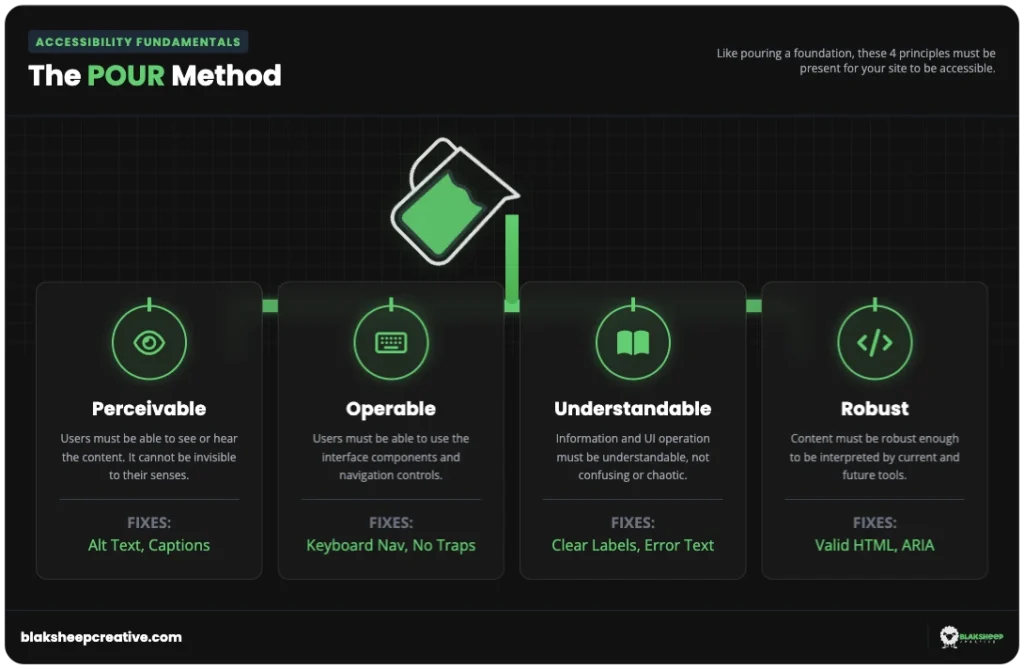
WCAG is built on four foundational principles. If you understand these, accessibility becomes far less mysterious.
- Perceivable: Users must be able to perceive content through text alternatives, captions, and readable contrast
- Operable: Users must be able to navigate and use the site via keyboard (not just mouse/touch)
- Understandable: Content and interactions should be predictable, with clear labels and useful error messages
- Robust: Code should be semantic and clean so that assistive technologies can interpret it reliably
Unsure if your website meets these 4 principles?
You don’t need to be a developer to find out. We’ve added a free tool to this page that scans your site against these exact standards—instantly.
The Part Most Articles Miss: Accessibility Is a Conversion Problem
Most business owners hear “accessibility” and think “legal compliance.”
But in the real world, accessibility failures show up as lost revenue. Quietly. Consistently. And often invisibly.
Here’s what we mean:
- A user can’t open your menu without a mouse
- A customer can’t complete your form because the fields aren’t labeled correctly
- A prospect can’t see your call-to-action because the contrast is too low on mobile
- A keyboard user gets stuck in a pop-up and abandons the page
Those aren’t theoretical. They’re common patterns.
How does website accessibility affect conversions?
- Reduces form abandonment: By allowing keyboard and screen-reader users to complete checkout and contact forms
- Improves mobile usability: Through better contrast, spacing, and readable layouts in real-world conditions
- Lowers bounce rates: By removing navigation friction that causes users to leave without interacting

Accessibility Does Not Mean Redesigning Your Website
This fear prevents many business owners from addressing accessibility at all. They assume it means a total rebuild.
Most of the time, it doesn’t.
Many accessibility fixes are structural, not visual. That includes things like:
- Adding proper labels to form fields
- Fixing focus order and keyboard navigation
- Using semantic headings and landmarks
- Improving contrast where it’s objectively too low
Your branding can stay intact. Your design can stay modern. The goal isn’t to make your website “uglier.” The goal is to make it usable.
Why Drag-and-Drop Website Builders Create Hidden Accessibility Risks
A lot of accessibility issues aren’t caused by neglect. They’re caused by tools that prioritize visuals over structure.
Why do website builders often cause accessibility issues?
- They prioritize visual layout over semantic HTML structure
- Buttons: Are sometimes built as generic containers instead of real interactive elements
- Forms: Frequently miss programmatic labels required by screen readers
- Plugins: Cannot reliably fix underlying structural code problems

A Blunt Warning About Accessibility Widgets and Overlays
You’ve probably seen them: the little “accessibility” icon promising instant compliance.
Here’s the truth: overlays don’t fix accessibility. They sit on top of your site rather than fixing the underlying code.
Legal commentary like analysis from Loeb & Loeb on web accessibility overlays explains why overlays are widely viewed as insufficient from both a technical and legal perspective.
- Accessibility overlays: Do not repair underlying code and leave real WCAG violations unresolved
- Assistive technology conflicts: Many overlays interfere with screen readers and keyboard navigation
- Legal exposure: A significant portion of lawsuits involve sites that already had overlays installed
If a vendor promises “instant compliance” or “100% automated accessibility,” treat that as a red flag. Real accessibility requires real remediation.
Accessibility Helps SEO, AI Search, and Voice Assistants
This surprises many business owners, but it’s one of the most important reasons to take accessibility seriously today.
Search engines and AI systems rely on structure. They need clear signals about what content is, how it’s organized, and what each element does.
Why does website accessibility help SEO and AI search?
- Search engines: Interpret pages using semantic structure similar to what screen readers rely on
- AI systems: More easily summarize and cite pages with clear headings, labels, and landmarks
- Voice assistants: Depend on accessible markup to read pages aloud and support hands-free navigation

A 15-Minute Accessibility Reality Check You Can Do Today
You don’t need to be a developer to spot major problems. Here are quick checks that reveal common issues fast:
- Keyboard test: Navigate using only Tab and Enter
- Navigation check: Make sure you can reach every menu item, button, and form field
- Focus visibility: Confirm you can clearly see where you are on the page
- Zoom test: Zoom to 200% and confirm the layout remains readable without horizontal scrolling

How We Approach Accessibility at BlakSheep Creative
We don’t treat accessibility as a widget, a scare tactic, or a checkbox.
We treat it as:
- A UX issue
- A conversion issue
- A technical SEO issue
That means manual auditing, real remediation, and accessibility baked into how your site is built and maintained—not bolted on later.
Common Website Accessibility Questions Answered
If you’re new to this, you’re not behind. These are the questions we hear most often from small business owners once accessibility comes up.
Do small businesses really need to worry about website accessibility?
Yes. Small businesses are frequently targeted because it’s easy to scan websites at scale, and many owners settle quickly. If your website is part of how customers access your services—contacting you, booking, buying, or filling out forms—accessibility becomes a real business requirement.
Is WCAG 2.1 Level AA legally required?
WCAG is not a law in itself, but Level AA of WCAG 2.1 is commonly used as the practical benchmark for accessibility expectations. Aligning with it provides the strongest combination of usability, defensibility, and modern best practices.
Can an accessibility plugin or widget make my site compliant?
Typically, no. Widgets do not fix underlying structural problems like missing labels, broken keyboard navigation, or non-semantic elements. Many businesses have still faced claims even after installing overlays because the real barriers remain.
Will accessibility improvements ruin my website design?
In most cases, no. Many accessibility fixes are structural and do not require a complete redesign. Branding and layout usually remain intact while usability improves for everyone—including mobile users and older customers.
How often should a business test its website for accessibility?
Accessibility is ongoing. New content, design updates, plugins, and feature changes can introduce new issues. Most businesses benefit from an initial audit, followed by periodic checks—especially after major site updates.

Ready to Find Out Where Your Website Stands?
If you’re unsure whether your website is accessible—or you suspect it may be quietly turning customers away—the fastest way to get clarity is a professional, manual accessibility audit.
Request a Website Accessibility Audit: Complete the form below, and our team will review your site for real-world accessibility issues, conversion barriers, and WCAG 2.1 Level AA gaps—no widgets, no scare tactics, just clear next steps.
Last updated: December 2025
This content is for educational purposes only and does not constitute legal advice.