
By Clint Sanchez · Published · Updated · 3 min read
Quick answer
Web hosting is the storage of a website's files on a server connected to the internet; when someone types your URL, the server sends those files to their browser. The main types are shared, VPS, dedicated, and cloud hosting, chosen by expected traffic, resources, control, and budget. Moving hosts takes five steps: buy the new plan, back up files and databases, point DNS to the new host, upload, and test.
Key takeaways
- Without web hosting a website is not reachable by the public; hosting is the server that stores and serves its files.
- Shared hosting is the most affordable option and suits small personal or business sites, with many websites on one server.
- VPS hosting stores files on a virtual private server with more resources and control than shared hosting.
- Dedicated hosting puts one website on its own server and offers the most power and resources.
- Cloud hosting spreads a site across a network of servers for more flexibility and scalability.
- Choose a host by four factors: expected traffic, required resources such as storage and bandwidth, the level of server control you need, and budget.
- Transferring a site is five steps: buy the new plan, back up files and databases, change DNS, upload the backup, and test.
Hosting is where a Louisiana website lives, and it is almost never in Louisiana. That matters after a hurricane: when power is out across Livingston Parish and customers are checking from their phones to see if a Denham Springs business is open, the site stays up because the server is somewhere else. A host that cannot handle that surge of traffic, or a plan too small for it, is the one that fails when it counts.
Web hosting can be confusing for those new to building websites or running online businesses. This blog post will explain five common web hosting mysteries in simple terms.
Mystery 1: What is web hosting?
Web hosting refers to the process of storing a website’s files on a server that is connected to the internet. When a user types a website’s URL into their browser, they access the files stored on that server. Without web hosting, a website would not be accessible to the public.
Mystery 2: How does web hosting work?
Web hosting connects a website’s files to a server connected to the internet. When a user types a website’s URL into their browser, the server retrieves the files and sends them to the user’s device to be displayed. This process happens quickly, allowing the website to load almost instantly.
Want this handled for you? We build and market websites for Louisiana businesses, and we will tell you honestly if you do not need us.
Mystery 3: What are the different types of web hosting?
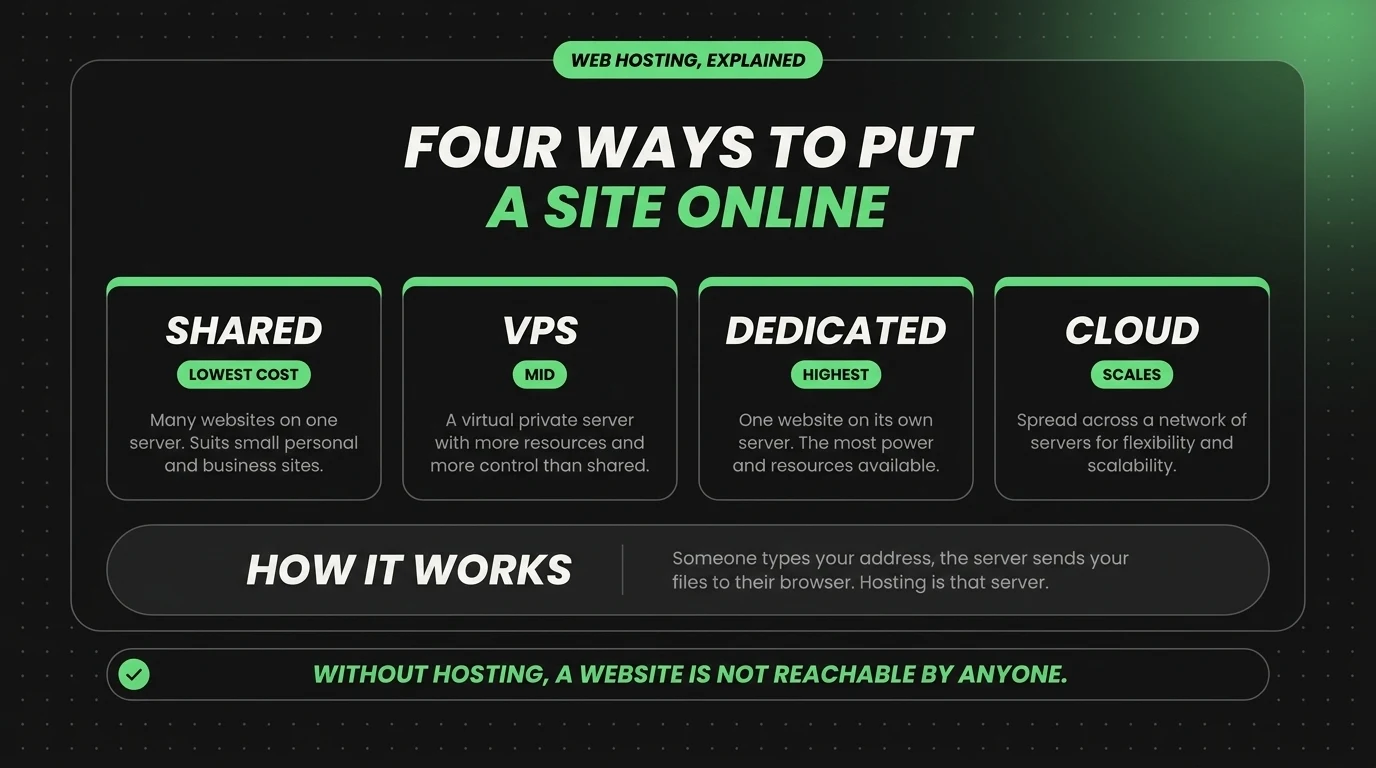
There are several types of web hosting, each with its own features and benefits. Some of the most common types of web hosting include shared hosting, VPS hosting, dedicated hosting, and cloud hosting.
- Shared hosting: This type of hosting is the most affordable and is suitable for small personal or business websites. A website’s files are stored on the same server as many other websites with shared hosting.
- VPS hosting: This type of hosting offers more resources and control than shared hosting. With VPS hosting, a website’s files are stored on a virtual private server, which is a more powerful version of a shared server.
- Dedicated hosting: This type of hosting is the most powerful and offers the most resources. With dedicated hosting, a website’s files are stored on a server dedicated solely to that website.
- Cloud hosting: This type of hosting is a newer option that uses a network of servers to store a website’s files. This allows for more flexibility and scalability than traditional hosting options.
Mystery 4: How do I choose the right web hosting for my website?
Choosing the right website hosting will depend on your specific needs and budget. Here are a few things to consider when making your decision:
- Traffic: If your website is expecting high traffic, you’ll need a hosting option that can handle that traffic.
- Resources: If your website requires a lot of resources, such as a lot of storage or bandwidth, you’ll need a hosting option that can provide those resources.
- Control: If you need more control over your website’s server, such as the ability to install custom software, you’ll need a hosting option that offers more control.
- Budget: Consider how much you are willing to spend on web hosting, and choose a hosting option that fits your budget.
Mystery 5: How do I transfer my website to a new web host?
Transferring your website to a new web host can seem hard, but it’s actually a straightforward process. Here are the basic steps to follow:
- Purchase a new web hosting plan from your desired host.
- Back up all the files and databases of your website.
- Change your domain name server (DNS) settings to point to the new hosting account.
- Upload the backed-up files and databases to the new host.
- Test your website on the new host to make sure everything is working correctly.
In conclusion, web hosting is a important component of any website, and understanding how it works can help you make more informed decisions about your online presence. By understanding the basics of web hosting, such as the different types of hosting available and how to transfer your website to a new host, you can make sure that your website is well-equipped to handle any traffic or resources it needs.
Looking for a real conversation about your business, no sales pitch, no commitment? Book a free 15-minute Discovery Call.
About the author

Founder & Lead Developer · Denham Springs, LA
Clint has built and marketed websites for 26 years, since founding BlakSheep Creative in 2000. He is also a 29-year firefighter and a 23-year member of IAFF Local 557, which is where the bias toward plain answers over sales copy comes from.
- Veteran-owned
- Firefighter-owned
- IAFF Local 557
Common Questions About Web Hosting
Short answers to the questions that come up most on this topic.
Is shared hosting good enough for a small business website?
What is the difference between VPS and dedicated hosting?
What is cloud hosting?
What do I need to back up before switching web hosts?
How do I know if I need more hosting resources?

Your next step, without the guesswork
No surprises, clear next steps, and a fixed price before anything starts.